New to bug reporting/troubleshooting, so forgive me if I'm formatting this post poorly.
Ran into the issue that some others have where the Global Menu doesn't show up at all in the RStudio window itself, nor the KDE Plasma panel's global menu. None of the shortcut keybinds worked either. Hitting ALT to bring it up also didn't work. Launching in software rendering mode also didn't help.
I finally found that disabling Application menus daemon background service fixed the issue for RStudio.
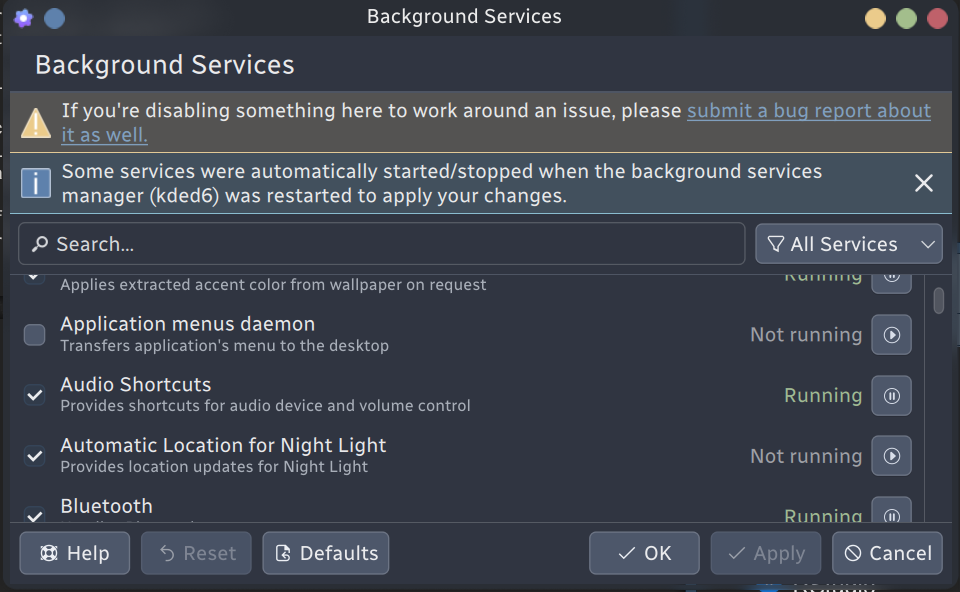
Image reference for those who need it.
Not sure what exactly led to this issue for myself or the others, but I wanted to drop this workaround for anyone else who needed it.
My setup, in case that helps figure out the root cause of this:
Operating System: Debian GNU/Linux 13
KDE Plasma Version: 6.3.6
KDE Frameworks Version: 6.13.0
Qt Version: 6.8.2
WM Theme: Utterly-Round-Dark
Theme: Breeze (UtterlyNord) [Qt], Nordic-darker [GTK2/3/4]
Hope this helps anyone who needs it! Let me know if you need any more info, or if I've posted this inappropriately.