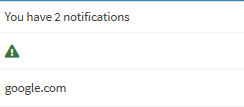
Hi, @duringju211,
This is breaking the layout because of the way shinydashboard::notificationItem() works. Let's take a look:
function (text, icon = shiny::icon("warning"), status = "success",
    href = NULL)
{
    tagAssert(icon, type = "i")
    validateStatus(status)
    if (is.null(href))
        href <- "#"
    icon <- tagAppendAttributes(icon, class = paste0("text-",
        status))
    tags$li(a(href = href, icon, text))
}
As you can see, shinydashboard::notificationItem() is returning a li element with an a element already created; by passing in a second a element as the text parameter, you end up creating two a elements within the li element. This is the resulting HTML:
<li>
  <a href="#">
    <i class="fa fa-users text-info"></i>
  </a>
  <a href="https://www.google.com/" target="_blank">google.com</a>
</li>
Unfortunately, as you can see from the implementation of shinydashboard::notificationItem(), there is no way to specify the target attribute of the a element. This leaves you with two options:
- Creating a custom
notificationItem() implementation that accepts more arguments in order to keep (more or less) the same functionality, like so:
notificationItemWithAttr <- function(text, icon = shiny::icon("warning"), status = "success", href = NULL, ...) {
  if (is.null(href))
    href <- "#"
  icon <- tagAppendAttributes(icon, class = paste0("text-",
                                                   status))
  tags$li(a(href = href, icon, text, ...))
}
Note: the tagAssert and validateStatus functions are not exported form shinydashboard and have been omitted from this custom implementation. While you can access them using :::, it is recommended that you either ask the package maintainer to export the function you need, or write your own version of it.
This can then be used to specify the target (as well as other attribtues) like so:
notificationItemWithAttr(icon = icon("users"), status = "info", text = "google.com", href = "https://www.google.com/", target = "_blank")
- Replace the
shinydashboard::notificationItem() call with the tags$li() call directly:
tags$li(
  a(href = "https://www.google.com/",
    target = "_blank",
    tagAppendAttributes(icon("users"), class = "text-info"),
    "google.com")
)
Hope this helps!