The models that run on RStudio Connect, run as the user hosts the RStudio Connect. This is generally a service account on the Linux machine. Hence , the models have all the privileges as the service account user.
Is it possible to make sure one model runs as User1 and another model runs as User2?
We want to make sure some models run with privileges of User1 and others with privileges of User2. How can this be done?
Welcome @yashgt! If I'm understanding your question correctly, I believe the RStudio Connect RunAs user should help you accomplish what you're looking for. The administration guide has details on how to configure this setting. Hope that helps!
Does this let me set up one model with one RunAs user and another model with another RunAs user? The examples in the document do not show multiple models.
@yashgt yes, the RunAs user can be set on a per-content basis:
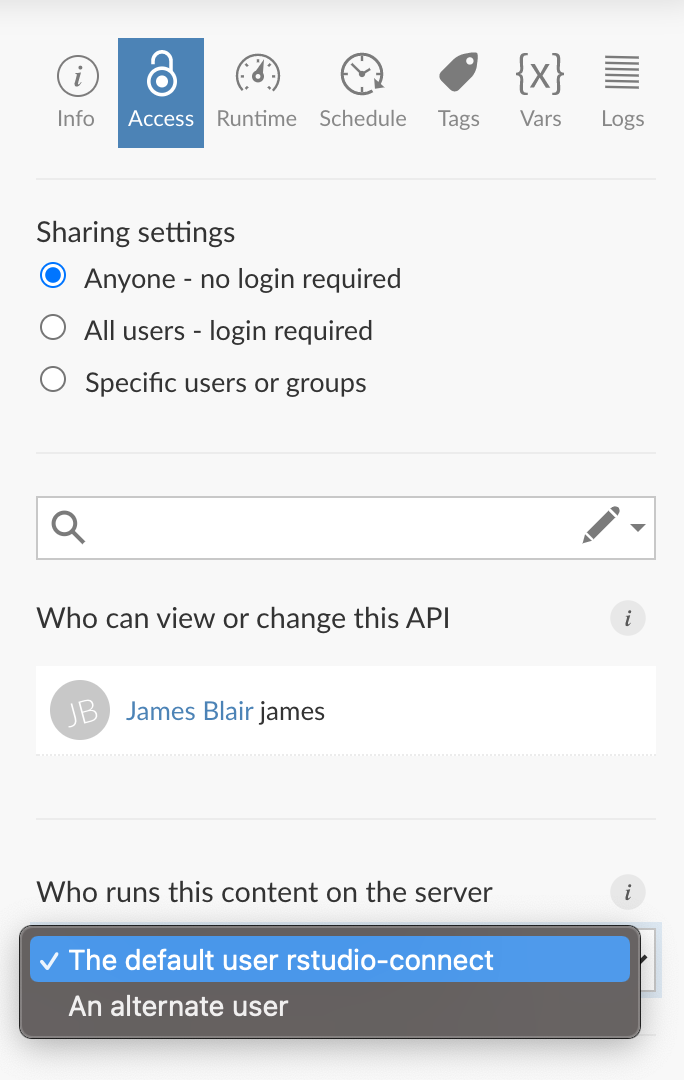
As per the documentation, if User1 is configured as the RunAs user, the users who will execute the application have to be part of the unix group to which User1 belongs.
This becomes an issue as every user then needs to be added to the group.
We have a number of applications already published in RStudio Connect and the RunAs has not been set for them. We intend to set the RunAs for new applications. Will we be forced to set the RunAs even for the existing applications?
Sorry for the massive delay in my repsonse here. I'm not sure if I follow what you mean with
As per the documentation, if User1 is configured as the RunAs user, the users who will execute the application have to be part of the unix group to which User1 belongs.
From the documentation:
Each Unix account used as a custom
RunAsmust be a member of the primary Unix group of theApplications.RunAsuser. This group membership requirement always applies, even whenApplications.RunAsdoes not use the defaultrstudio-connectuser.
The defaultrstudio-connectuser has a primary group also namedrstudio-connect. When using this defaultApplications.RunAsuser, yourhadleyUnix account must be a member of therstudio-connectgroup before that account is permitted to run a Shiny application.
This means that by default, any user that you use as the RunAs user must be a member of the rstudio-connect unix group. This does not depend on or impact the logged in user. For example, if I set the RunAs user to be james, and james is a member of the rstudio-connect group, then whenever anyone accesses that content on RStudio Connect, regardless of who they are, the process is run under the james unix account on the server. Therefore, the only user in this scenario that needs to be added to the rstudio-connect group is james.
Hope that helps.