Reactive data inside reactive regression function

I have a reactive data set and I wnat to calculate a regression, which must be reactive as well. I get the error: "Warning: Error in [.default: incorrect number of dimensions" I cannot find any information about reactives inside reactive. Please help?

  
  model <- reactive({
     #lm(mtcars[, c(input$variable)] ~ mtcars[ , c(input$variable2)], data = mtcars)
     lm(ds()[, c(input$inVar)] ~ ds()[ , c(input$inVar1)], data = ds()) 
     
   })
```**strong text**

It's most likely not related to reactives inside reactives but current input and/or ds() states.
Have you tried debugging input$inVar, input$inVar1 and ds() in a similar way as suggested yesterday - How to get the statistical summary of a reaactive dataset - #2 by margusl - adding few observers to track reactive values?

server <- function(input, output, session) {
  ...
  observe( str(ds()) )
  observe({
    print("input$inVar:")
    str(input$inVar)
  })
  observe({
    print("input$inVar1:")
    str(input$inVar1)
  })
  ...
}

It would help others to help you if you'd share bit more of your app, for example we do not really know what UI controls are you using for inputs ( input$inVar* ) or how and when is ds() invalidated.
It would be ideal if you could include a minimal reproducible example that includes a complete yet minimal runnable Shiny app (including ui & server objects, all required libraries), just enough for others to reproduce your issue.

For what it's worth, a more or less minimal (though working) example could look something like this:

library(shiny)
library(bslib)

ds_lst <- list(mtcars = mtcars, iris = iris)
ui <- page_sidebar(
  sidebar = sidebar(
    selectInput("ds", "Dataset", choices = names(ds_lst)),
    varSelectInput("var1", "Response", mtcars),
    varSelectInput("var2", "Regressor", mtcars),
    actionButton("fit", "Fit")
  ),
  card(verbatimTextOutput("txt"))
)

server <- function(input, output, session) {
  ds <- reactive(ds_lst[[input$ds]])
  
  # use action button to trigger model update
  model <- eventReactive(input$fit, {
    # varSelectInput returns symbols, so we can use those directly with 
    # rlang::new_formula()
    f_ <- rlang::new_formula(input$var1, input$var2)
    m_ <- lm(formula = f_, data = ds())
    m_$call$formula <- f_
    m_
  })
  
  observe({
    # update select inputs when ds() changes
    updateVarSelectInput(session, "var1", data = ds())
    updateVarSelectInput(session, "var2", data = ds())
  })
  
  output$txt <- renderPrint(summary(model()))
}

shinyApp(ui, server)
Screen rec

chrome_2IJHlWg90M

This the code so far. I will try to implement the code that you sugested.
Thank you

GUI

#
# This is the user-interface definition of a Shiny web application. You can
# run the application by clicking 'Run App' above.
#
# Find out more about building applications with Shiny here:
#
#    https://shiny.posit.co/
#

library(shiny)
library(dplyr)
library(bslib)


datasets <- list(AirPassengers = AirPassengers, CO2 = CO2, Formaldehyde = Formaldehyde, Indometh = Indometh, 
                 LifeCycleSavings = LifeCycleSavings, OrchardSprays = OrchardSprays, Theoph = Theoph, 
                 UKDriverDeaths = UKDriverDeaths, WWWusage = WWWusage, austres = austres,chickwts = chickwts,
                 esoph = esoph, faithful = faithful, islands = islands, lynx = lynx, nhtemp = nhtemp, precip = precip, randu = randu,
                 stack.loss = stack.loss, state.area = state.area, state.region = state.region, sunspots = sunspots, BJsales = BJsales,
                 ChickWeight = ChickWeight, HairEyeColor = HairEyeColor, InsectSprays = InsectSprays, Loblolly = Loblolly, PlantGrowth = PlantGrowth,
                 Titanic = Titanic, UKgas = UKgas, USPersonalExpenditure = USPersonalExpenditure, WorldPhones = WorldPhones, anscombe = anscombe, 
                 beaver1 = beaver1, co2 = co2, euro = euro, fdeaths = fdeaths, infert = infert, ldeaths = ldeaths, mdeaths = mdeaths,
                 nottem = nottem, presidenst = presidents, rivers = rivers, stackloss = stackloss, state.center = state.center, state.x77 = state.x77,
                 swiss = swiss, volcano = volcano, BJsales.lead = BJsales.lead, DNase = DNase, Harman23.cor = Harman23.cor, JohnsonJohnson = JohnsonJohnson, 
                 Nile = Nile, mtcars = mtcars, trees = trees)

ui <- fluidPage(
  
  titlePanel(tags$h2("STATISTICAL ANALYSIS AND PREDICTOR FOR R DATA SETS", style = "color: blue;")),
  
  radioButtons("inDs", "Select dataset:", choices = names(datasets)),
  varSelectInput("inVar", "Select variable:", datasets[[1]]),
  varSelectInput("inVar1", "Select a second variable:", datasets[[1]]),

  tableOutput("outData"),
  tableOutput("outData1"),
  plotOutput("hist"),
  plotOutput("hist2"),
 
  plotOutput("plot", click = "plot_click"),
  verbatimTextOutput("info"),
textOutput("summary", container = tags$h3)
  %>% 
    tagAppendAttributes(style= 'color:blue;'),
  tableOutput("size"),
  tableOutput("sum"),
  textOutput("regres")
)

SERVER

```{r}
#
# This is the server logic of a Shiny web application. You can run the
# application by clicking 'Run App' above.
#
# Find out more about building applications with Shiny here:
#
#    https://shiny.posit.co/
#

library(shiny)
library(ggplot2)
library(caret)
library(shinyPredict)
library(ISLR2)
library(skimr)


# Define server logic required to draw a histogram
function(input, output, session) {
  
  datasets <- list(AirPassengers = AirPassengers, CO2 = CO2, Formaldehyde = Formaldehyde, Indometh = Indometh, 
                   LifeCycleSavings = LifeCycleSavings, OrchardSprays = OrchardSprays, Theoph = Theoph, 
                   UKDriverDeaths = UKDriverDeaths, WWWusage = WWWusage, austres = austres,chickwts = chickwts,
                   esoph = esoph, faithful = faithful, islands = islands, lynx = lynx, nhtemp = nhtemp, precip = precip, randu = randu,
                   stack.loss = stack.loss, state.area = state.area, state.region = state.region, sunspots = sunspots, BJsales = BJsales,
                   ChickWeight = ChickWeight, HairEyeColor = HairEyeColor, InsectSprays = InsectSprays, Loblolly = Loblolly, PlantGrowth = PlantGrowth,
                   Titanic = Titanic, UKgas = UKgas, USPersonalExpenditure = USPersonalExpenditure, WorldPhones = WorldPhones, anscombe = anscombe, 
                   beaver1 = beaver1, co2 = co2, euro = euro, fdeaths = fdeaths, infert = infert, ldeaths = ldeaths, mdeaths = mdeaths,
                   nottem = nottem, presidenst = presidents, rivers = rivers, stackloss = stackloss, state.center = state.center, state.x77 = state.x77,
                   swiss = swiss, volcano = volcano, BJsales.lead = BJsales.lead, DNase = DNase, Harman23.cor = Harman23.cor, JohnsonJohnson = JohnsonJohnson, 
                   Nile = Nile, mtcars = mtcars, trees = trees)
 
  ds <- reactive( datasets[[input$inDs]] )
  
  observe(updateVarSelectInput(session, "inVar", data = ds()))
  observe(updateVarSelectInput(session, "inVar1", data = ds()))
  
 output$outData <- renderTable({ 
   var_char <- as.character(input$inVar)
    # deal with race conditions,  input$inVar might still include 
    # a column name from previously selected dataset
    req(var_char %in% names(ds()))
    ds()[1:12, var_char, drop = FALSE] 
  }, align = "l")
 
 
 output$outData1 <- renderTable({ 
   var_char1 <- as.character(input$inVar1)
   # deal with race conditions,  input$inVar might still include 
   # a column name from previously selected dataset
   req(var_char1 %in% names(ds()))
   ds()[1:12, var_char1, drop = FALSE] 
 }, align = "l")

 output$hist <- renderPlot({
   
   ggplot(ds(), aes_string(as.character(input$inVar))) + geom_histogram(binwidth = 2, color = "red", fill = "blue")
 }, res = 50)
 
 output$hist2 <- renderPlot({
   ggplot(ds(), aes_string(as.character(input$inVar1))) + geom_histogram(binwidth = 2, color = "red", fill = "blue")
 }, res = 50)
 

 output$plot <- renderPlot({
   
   ggplot(ds(), aes_string(as.character(input$inVar), as.character(input$inVar1))) + geom_point(color = "red") + geom_line(color = "blue")
 }, res = 96)
 
  
 output$info <- renderText({
   paste0("x=", input$plot_click$x, "\ny=", input$plot_click$y)
 })
  
  output$summary <- renderText({
    paste("SUMMARY STATISTICS")
  })
 
  
 output$size <- renderTable(
   as.numeric(dim(ds()))
  )
  
  output$sum <- renderTable({
   skim(ds())
  })
  
 model <- reactive({
     #lm(mtcars[, c(input$variable)] ~ mtcars[ , c(input$variable2)], data = mtcars)
 
    lm(req(as.character(input$inVar) %in% names(ds()))~  req(as.character(input$inVar) %in% names(ds())), data = ds())
     
  })
   
   output$regres <- renderText({
     model()
   })

}
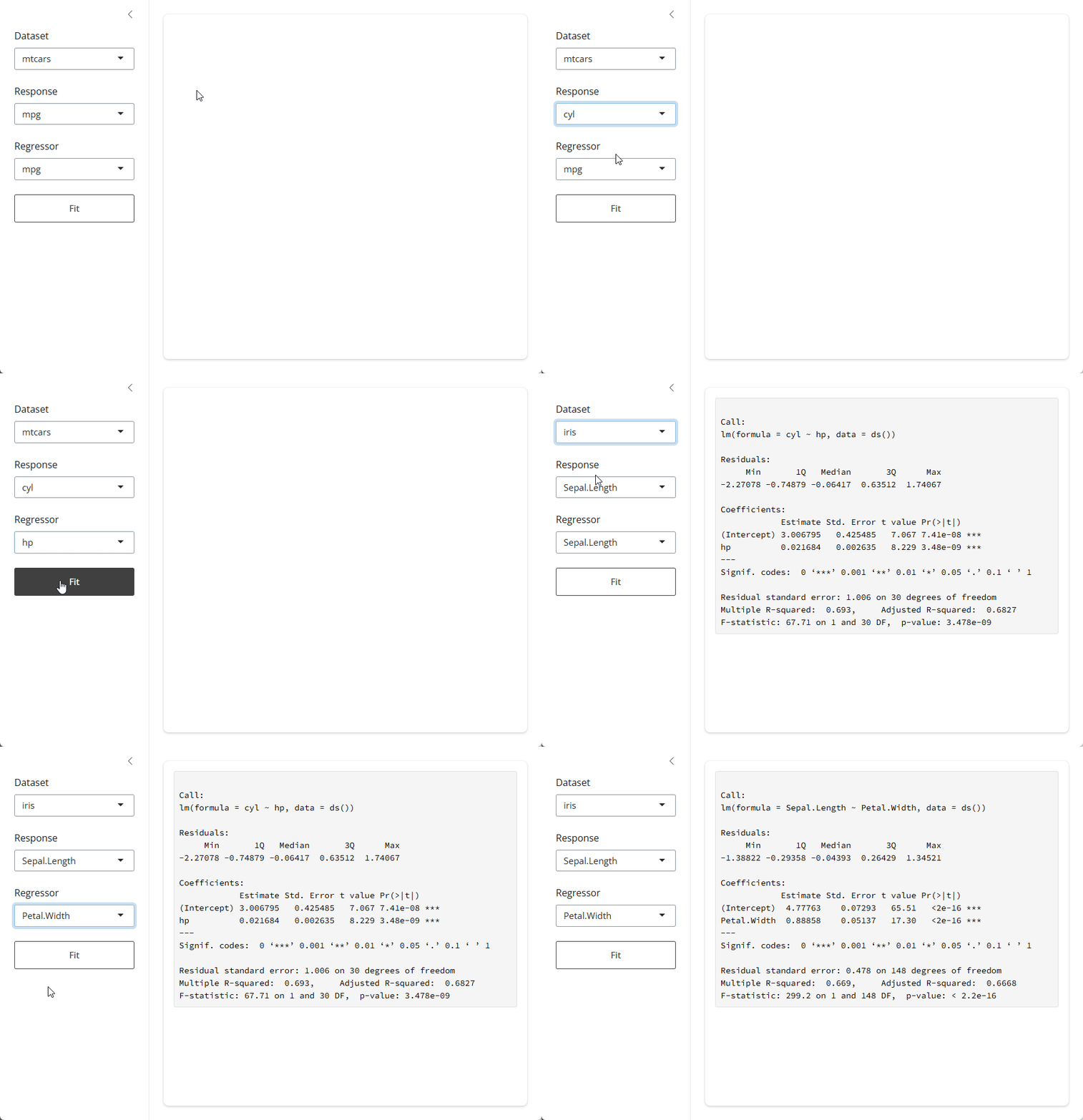
model reactive in your last reply is quite different from the one in your original post.

lm(ds()[, c(input$inVar)] ~ ds()[ , c(input$inVar1)], data = ds())

would (kind of) work if input$inVar & input$inVar1 are character strings, e.g. from selectInput(), but you can't directly use symbol values from varSelectInput() for subsetting. Also, vectors in lm() formulas (like ds()[, c(input$inVar)] or mtcar[,"mpg"]) make it ignore data argument.


I guess you already figured it out as your last reply reads:

lm(req(as.character(input$inVar) %in% names(ds()))~  req(as.character(input$inVar) %in% names(ds())), data = ds())

Though req(as.character(input$inVar) %in% names(ds())) can only evaluate to TRUE and it would not work in a formula expression anyway.

To name a few methods, you could build a formula with rlang::new_formula() as in previously posted example (works with symbol arguments), with stats::reformulate()( response can be symbol but termlabels must be character), as.formula(paste(...)) (coerces symbols to character vectors):

# with varSelectInput server values (i.e. symbols, not character vectors)
rlang::new_formula(input$inVar, input$inVar1)
#> cyl ~ mpg
reformulate(response = input$inVar, termlabels = as.character(input$inVar1))
#> cyl ~ mpg
as.formula(paste(input$inVar, "~", input$inVar1))
#> cyl ~ mpg

Perhaps a bit cleaner method for checking if variables exist in a frame would be through exists(), which conveniently works with symbols, so one possible implementation of model reactive could look like this:

model <- reactive({
  req(exists(input$inVar,  ds()))
  req(exists(input$inVar1, ds()))
  
  lm(as.formula(paste(input$inVar, "~", input$inVar1)), data = ds())
})

I have used different ways of implementing lm, and I do not get an error, but I do not get an output display.
Please see code below:

library(shiny)
library(ggplot2)
library(caret)
library(shinyPredict)
library(ISLR2)
library(skimr)
library(rlang)
library(stats)

Define server logic required to draw a histogram

function(input, output, session) {
  
  datasets <- list(AirPassengers = AirPassengers, CO2 = CO2, Formaldehyde = Formaldehyde, Indometh = Indometh, 
                   LifeCycleSavings = LifeCycleSavings, OrchardSprays = OrchardSprays, Theoph = Theoph, 
                   UKDriverDeaths = UKDriverDeaths, WWWusage = WWWusage, austres = austres,chickwts = chickwts,
                   esoph = esoph, faithful = faithful, islands = islands, lynx = lynx, nhtemp = nhtemp, precip = precip, randu = randu,
                   stack.loss = stack.loss, state.area = state.area, state.region = state.region, sunspots = sunspots, BJsales = BJsales,
                   ChickWeight = ChickWeight, HairEyeColor = HairEyeColor, InsectSprays = InsectSprays, Loblolly = Loblolly, PlantGrowth = PlantGrowth,
                   Titanic = Titanic, UKgas = UKgas, USPersonalExpenditure = USPersonalExpenditure, WorldPhones = WorldPhones, anscombe = anscombe, 
                   beaver1 = beaver1, co2 = co2, euro = euro, fdeaths = fdeaths, infert = infert, ldeaths = ldeaths, mdeaths = mdeaths,
                   nottem = nottem, presidenst = presidents, rivers = rivers, stackloss = stackloss, state.center = state.center, state.x77 = state.x77,
                   swiss = swiss, volcano = volcano, BJsales.lead = BJsales.lead, DNase = DNase, Harman23.cor = Harman23.cor, JohnsonJohnson = JohnsonJohnson, 
                   Nile = Nile, mtcars = mtcars, trees = trees)

  #output$pkgs <- renderPrint(.packages(all.available = TRUE))
  
  
 # output$dat <- renderPrint(data(package = "datasets")$results[ , "Item"])
  #print(trees)
 
  ds <- reactive( datasets[[input$inDs]] )
  
  observe(updateVarSelectInput(session, "inVar", data = ds()))
  observe(updateVarSelectInput(session, "inVar1", data = ds()))
  
  observe( as.character(ds()) )
  observe({
    print("input$inVar:")
    req(input$inVar)
  })
  observe({
    print("input$inVar1:")
    req(input$inVar1)
  })

 
 #output$data <- renderTable({
    
    #mtcars[, c(input$variable), drop = FALSE]
 #   trees[, c(input$variable), drop = FALSE]
 # }, rownames = TRUE)
  
 output$outData <- renderTable({ 
   var_char <- as.character(input$inVar)
    # deal with race conditions,  input$inVar might still include 
    # a column name from previously selected dataset
    req(var_char %in% names(ds()))
    ds()[1:12, var_char, drop = FALSE] 
  }, align = "l")
 
 
 output$outData1 <- renderTable({ 
   var_char1 <- as.character(input$inVar1)
   # deal with race conditions,  input$inVar might still include 
   # a column name from previously selected dataset
   req(var_char1 %in% names(ds()))
   ds()[1:12, var_char1, drop = FALSE] 
 }, align = "l")

  #output$data2 <- renderTable({
   
    #mtcars[, c(input$variable2), drop = FALSE]
   # trees[, c(input$variable), drop = FALSE]
  #}, rownames = TRUE)

 output$hist <- renderPlot({
   
   ggplot(ds(), aes_string(as.character(input$inVar))) + geom_histogram(binwidth = 2, color = "red", fill = "blue")
 }, res = 50)
 
 output$hist2 <- renderPlot({
   ggplot(ds(), aes_string(as.character(input$inVar1))) + geom_histogram(binwidth = 2, color = "red", fill = "blue")
 }, res = 50)
 

 output$plot <- renderPlot({
   
   ggplot(ds(), aes_string(as.character(input$inVar), as.character(input$inVar1))) + geom_point(color = "red") + geom_line(color = "blue")
 }, res = 96)
 
  
 output$info <- renderText({
   paste0("x=", input$plot_click$x, "\ny=", input$plot_click$y)
 })
  
  output$summary <- renderText({
    paste("SUMMARY STATISTICS")
  })
 
  
 output$size <- renderTable(
   as.numeric(dim(ds()))
  )
  
  output$sum <- renderTable({
   skim(ds())
  })
  
 model <- reactive({
     #lm(mtcars[, c(input$variable)] ~ mtcars[ , c(input$variable2)], data = mtcars)
   
   # Creating a formula using reformulate()
   req(exists(inputVar, ds()))
   req(exists(inputVar1, ds()))
   #formula <- reformulate(c("input$inVar", "input$inVar"), response = "input$inVar")
   # Fitting a linear regression model
   #model <- lm(formula, data = ds())
   lm(as.formula(paste(input$inVar, "~", input$inVar1)), env = ds())
  reformulate(response = input$inVar, termlabels = as.character(input$inVar1))
  })
   
   output$regres <- renderText({
     model()
   })

GUI

Your inputs are input$inVar & input$inVar, not inputVar & inputVar1 .

Not sure where that env comes from, but if it's still stats::lm() , it will fail when called without data:

lm(mpg ~ cyl, env  = mtcars)
#> Error in eval(predvars, data, env): object 'mpg' not found

lm(mpg ~ cyl, data = mtcars)
#> 
#> Call:
#> lm(formula = mpg ~ cyl, data = mtcars)
#> 
#> Coefficients:
#> (Intercept)          cyl  
#>      37.885       -2.876

When I use data and the expression below, the results do not get displayed .

lm(as.formula(paste(input$inVar, "~", input$inVar1)), data = ds())
reformulate(response = input$inVar, termlabels = as.character(input$inVar1))

No display by

output$regres <- renderText({
     model()

and

  textOutput("regress")

})

This happens with all the different ways I have tried to do lm.

   lm(reformulate(input$InVar, input$inVar1), data = ds())

I have also tried renderPrint() with verbatimTextOutput()

I found this on the web:

There's a big difference between a character value in R and a proper symbol. A formula is a collection of unevaluated symbols. It does not involved character values at all. If you want to build a formula from character values (which are what input$IndVar and input$DepVar return), you need to use a function like reformulate() or as.formula()

You are assigning to "regres" in the server function while having "regress" in ui.
There might be more issues, for example if you actually have

lm(as.formula(paste(input$inVar, "~", input$inVar1)), data = ds())
reformulate(response = input$inVar, termlabels = as.character(input$inVar1))

in your model(), then its value will be formula from reformulate() and not model from lm().


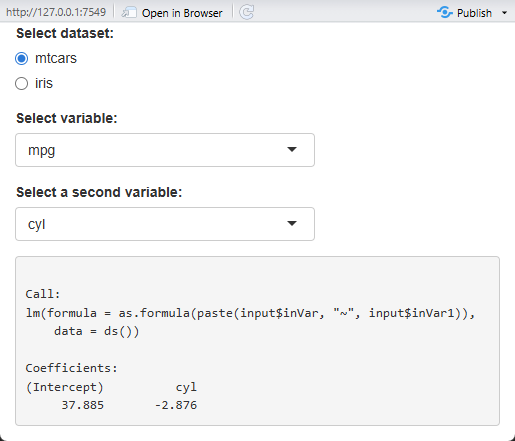
Another workin one, stripped down to just include model() reactive and its printout.

library(shiny)
library(cli)

datasets <- list(mtcars = mtcars, iris = iris)

ui <- fluidPage(
  radioButtons("inDs", "Select dataset:", choices = names(datasets)),
  varSelectInput("inVar", "Select variable:", datasets[[1]]),
  varSelectInput("inVar1", "Select a second variable:", datasets[[2]]),

  verbatimTextOutput("regress")
)
server <- function(input, output, session) {
  ds <- reactive(datasets[[input$inDs]])
  # ds() updates to console
  observe(print(head(ds())))

  observe(updateVarSelectInput(session, "inVar", data = ds()))
  observe(updateVarSelectInput(session, "inVar1", data = ds()))
  # inVar* updates to console
  observe(cli_alert_info("input$inVar:  {input$inVar}"))
  observe(cli_alert_info("input$inVar1: {input$inVar1}"))

  # input state check 
  input_selection_ok <- reactive({
    req(input$inVar != input$inVar1)
    req(exists(input$inVar, ds()))
    req(exists(input$inVar1, ds()))
  })
  observe(cli_alert_info("input_selection_ok: {input_selection_ok()}"))

  model <- reactive({
    req(input_selection_ok())
    lm(as.formula(paste(input$inVar, "~", input$inVar1)), data = ds())
  })

  output$regress <- renderPrint({
    print(model())
  })
}
shinyApp(ui, server)


Changed debugging observers so there would be some output to console and collected checks into single input_selection_ok() reactive.

Thank you very much for all your help. Rective processes are very new to mee.
~Giuseppa