R version 4.6.0 keeps pulling wrong RTools version

Dear community,

I am running into a persistent toolchain issue when trying to compile C/C++ code from R on a Windows machine (institutional managed environment).

  • R version: R version 4.6.0 (2026-04-24 ucrt)
  • Rtools: Rtools45 installed in C:\rtools45
  • Sys.which("make") returns C:\\rtools45\\usr\\bin\\make.exe, so R is seeing the Rtools45 make binary.

Even when I work from a local directory where I have full access, a simple build-tools check fails:

r

getwd()
# [1] "/home/k/Username/Documents"   # default institutional home

setwd("C:/Users/Username/Downloads")  # local folder I fully control

install.packages("pkgbuild", type = "binary")
library(pkgbuild)

check_build_tools(debug = TRUE)

This produces:

text

Trying to compile a simple C file
Running "C:/PROGRA~1/R/R-46~1.0/bin/x64/Rcmd.exe" SHLIB foo.c
Error in system(paste(MAKE, p1(paste("-f", shQuote(makefiles))), "compilers"),  : 
  'CreateProcess' failed to run 'C:\rtools45\usr\bin\make.exe -f "C:/PROGRA~1/R/R-46~1.0/etc/x64/Makeconf" -f "C:/PROGRA~1/R/R-46~1.0/share/make/winshlib.mk" compilers'
Calls: <Anonymous> -> .shlib_internal -> system
Execution halted
trying URL 'https://cloud.r-project.org/bin/windows/Rtools/rtools44/files/rtools44-6459-6401.exe'
Content type 'application/x-msdownload' length 451591776 bytes (430.7 MB)
downloaded 430.7 MB

Error: Could not find tools necessary to compile a package
Call `pkgbuild::check_build_tools(debug = TRUE)` to diagnose the problem.

It seems:

  • R correctly locates make.exe from Rtools45.
  • When pkgbuild (and similarly brms / Stan) try to compile a trivial test C file via R CMD SHLIB, Windows’ CreateProcess call fails to spawn C:\rtools45\usr\bin\make.exe with the given arguments.
  • Because this check fails, pkgbuild then attempts to download “build tools” and falls back to the Rtools44 URL, which does not resolve the underlying issue.

I have already:

  • Updated pkgbuild and the modeling packages (e.g., brms) from binaries for R 4.6.
  • Moved the working directory to a local folder on C: where I have full write access.
  • Verified that Sys.which("make") points to Rtools45.

At this point, it looks like a different problem I cannot define rather than an R-only configuration issue.

Would you have any suggestions ?
pkgbuild never downloads Rtools, so this must be something else.

Any idea what it could be ? I already tried to uninstall and re-install awith the newest versions

First, please copy and paste the full input and output, to make sure that we can see all details.

Second, what is your RStudio version? Does this happen outside of RStudio? E.g. if you start R from a windows terminal?

I can confirm that this has started happening recently on Windows (I am on Win 10 Pro with ESU). rtools45 was correctly installed and detected by R but compiling anything from source would fail. Disabling mandatory ASLR for everything in the rtools45 directory solved it (see end of this post for the link to the solution). Just adding make, g++, and other binaries from the rtools45 directory structure didn't help (I came across that posted as a solution on one forum).

I updated R recently on another Win 10 machine and started running into the same problem (4.5.x to 4.6.1 with rtools45 already installed).

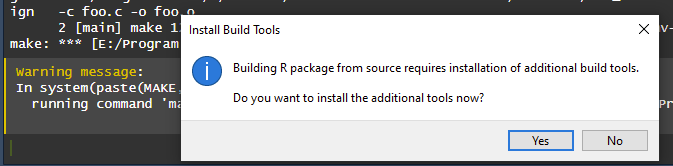
I can also confirm that pkgbuild::check_build_tools() tries to compile a file, fails, and then asks to install Rtools, which then opens a dialog box that downloads rtools44, fails to detect the install the first time, then detects it correctly the second time when that function is run again. If rtools45 is already installed, it continues to do this in a loop iirc. If it's not installed, then the process throws an error that the wrong version of rtools is installed. I have not tried to repeat this exercise with previous versions of R, but I do not remember encountering this issue with previous versions of R either, and i've been installing packages from source for a few years at this point.

It's worth noting that rtools45 installer from the website installs to C:\rtools45 by default, but the version that check_build_tools() downloads installs to C:\RBuildToolswithout allowing for user customization. I had installed rtools to a different drive, but I tried installing both R and Rtools45 to C:\ (default settings) and it didn't help. The only "fix" was disabling ASLR.

Repro steps:

  1. On windows (tested with win 10), install R, Rtools45 (and optionally Rstudio/Positron, i'm using Rstudio)
  2. Try: Install any package from source/github OR run Rcpp:evalCpp("2+2") OR pkgbuild::check_build_tools(debug=TRUE)
> pkgbuild::check_build_tools(debug = TRUE)
Trying to compile a simple C file
Running "E:/Program Files/R/R-4.6.1/bin/x64/Rcmd.exe" SHLIB foo.c
      2 [main] make 462 dofork: child -1 - forked process 13768 died unexpectedly, retry 0, exit code 0xC0000142, errno 11
make: *** [E:/Program Files/R/R-4.6.1/share/make/winshlib.mk:39: compilers] Error 127
gcc  -I"E:/Program Files/R/R-4.6.1/include" -DNDEBUG     -I"E:/rtools45/x86_64-w64-mingw32.static.posix/include"      -O2 -Wall -std=gnu2x  -mfpmath=sse -msse2 -mstackrealign   -c foo.c -o foo.o
      2 [main] make 1734 dofork: child -1 - forked process 16564 died unexpectedly, retry 0, exit code 0xC0000142, errno 11
make: *** [E:/Program Files/R/R-4.6.1/etc/x64/Makeconf:297: foo.o] Error 127
Warning message:
In system(paste(MAKE, p1(paste("-f", shQuote(makefiles))), "compilers"),  :
  running command 'make -f "E:/Program Files/R/R-4.6.1/etc/x64/Makeconf" -f "E:/Program Files/R/R-4.6.1/share/make/winshlib.mk" compilers' had status 2
Error: Could not find tools necessary to compile a package
Call `pkgbuild::check_build_tools(debug = TRUE)` to diagnose the problem.

Popup to install:

If you say "no", you get the error at the end ("could not find tools").

Verified workaround:

I know Git also asks to disable mandatory ASLR on install to avoid certain issues.

Hopefully this helps others, i wasted two days trying to figure this out. And hopefully this gets fixed properly, wherever the problem lies.

pkgbuild does not open popups. RStudio or Positron might, I don't know. From the output is seems that the compilation started by pkgbuild uses the correct Rtools 45.

So, again, what is your RStudio version? Does this happen outside of RStudio? E.g. if you start R from a windows terminal?

If this is in RStudio, can you try updating the RStudio version?

Sorry for the delay, there was work trips and vacations in between.

Thanks Chinaar, I will try asap to see whether it solves my issue.
Gabor the information on my R version was posted in my initial message. I never tried outside R, because I am more comfortable using R studi than the terminal and I update my R version to the latest back in June, thinking that might solve it.

Anything else?