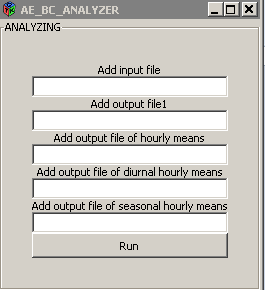
would like to create a GUI frame for my R script based on Playing with GUIs in R with RGtk2 | R-bloggers
This script imports a table implements some calculation with the data from the imported table and write the results into output files. The structure of my script is like:
myFile = file.choose()
df = read.table(myFile, header = TRUE)
\ calculations…(for loops)
write.table(df, file=file.choose(), row.names = FALSE, sep = "\t")
\ other calculations ....
write.table(df, file=file.choose(), row.names = FALSE, sep = "\t")
I would need one button which will run the whole script if the user clicks on it. I attached a .png about a GUI what I would like to use. According to the above-mentioned example, I should use gSignalConnect to connect the button to a function. How can I connect the button to a function which implements the whole scrip such as the source()?
Thank you for your help in advance!