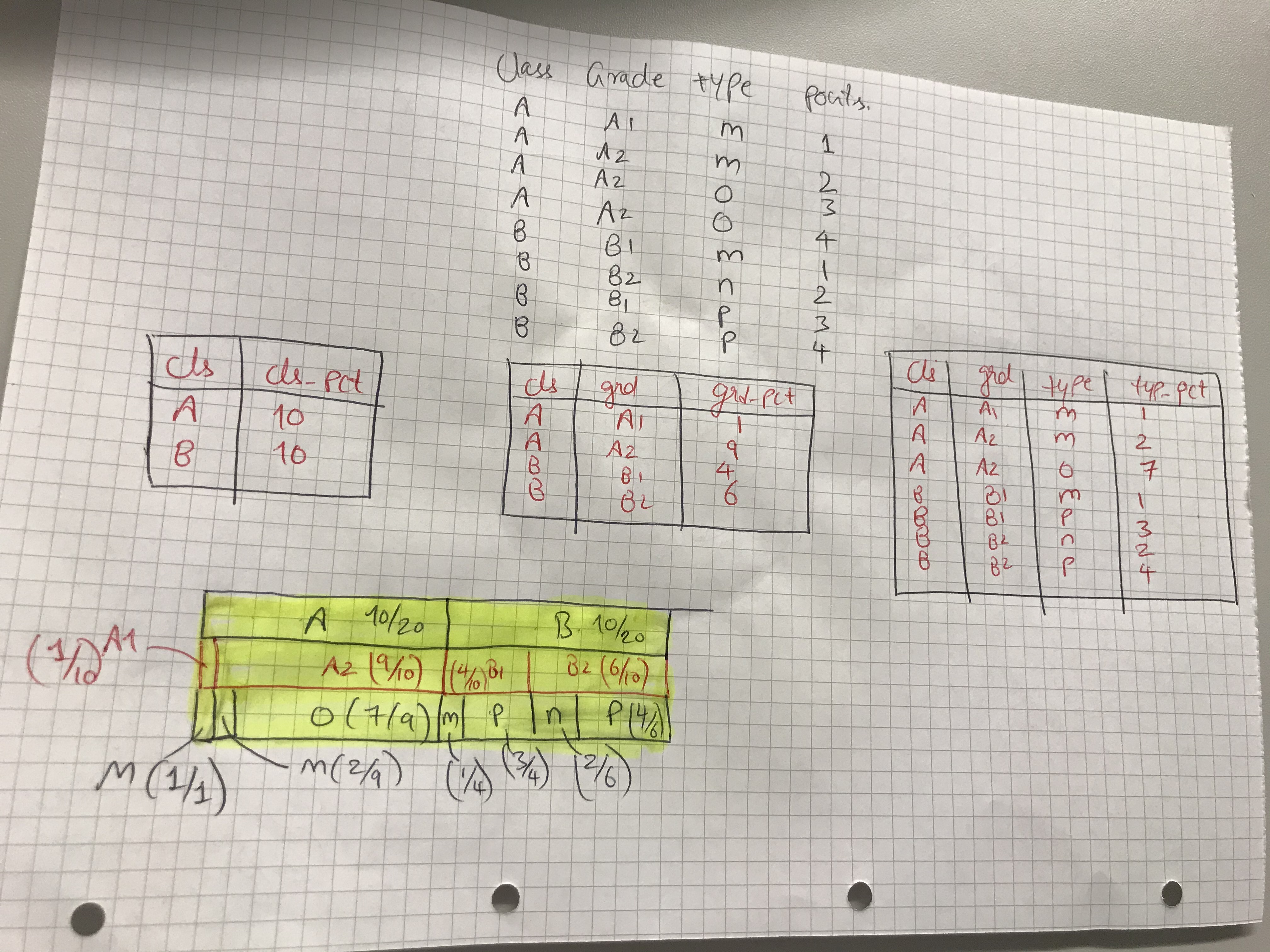
Goal is to produce a visualization indicating ratio.
library(tidyverse)

# Dataset creation
df <- data.frame(cls = c(rep("A",4),rep("B",4)),
                 grd = c("A1",rep("A2",3),rep(c("B1","B2"), 2)),
                 typ = c(rep("m",2),rep("o",2),"m","n",rep("p",2)),
                 pnts = c(rep(1:4,2)))

df

#### Data wrangling
df1 <- df %>%
  group_by(cls) %>%
  summarise(cls_pct = sum(pnts))
df1

df2 <- df %>%
  group_by(cls,grd) %>%
  summarize(grd_pct = sum(pnts))
df2

df3 <- df %>%
  group_by(cls,grd,typ) %>%
  summarise(typ_pct = sum(pnts))
df3

#### Attempt to combine all df1,df2,df3
# but mutate and summarise are mixing up leading to wrong results
df3 %>%
  group_by(cls,grd) %>%
  mutate(grd_pct = sum(typ_pct)) %>%
  group_by(cls) %>%
  mutate(cls_pct = sum(grd_pct))
joels
December 16, 2019, 6:34pm
2
Is this what you're trying to do:
library(tidyverse)

df %>%
  group_by(cls,grd,typ) %>%
  summarise(pnts = sum(pnts)) %>%
  mutate(pct = pnts/sum(pnts)) %>%
  bind_rows(df %>%
              group_by(cls, grd) %>%
              summarise(pnts = sum(pnts)) %>%
              mutate(pct = pnts/sum(pnts),
                     typ = "All")) %>%
  bind_rows(df %>%
              group_by(cls) %>%
              summarise(pnts = sum(pnts)) %>%
              mutate(pct = pnts/sum(pnts),
                     grd = "All",
                     typ = "All"))
   cls   grd   typ    pnts   pct
   <fct> <chr> <chr> <int> <dbl>
 1 A     A1    m         1 1
 2 A     A2    m         2 0.222
 3 A     A2    o         7 0.778
 4 B     B1    m         1 0.25
 5 B     B1    p         3 0.75
 6 B     B2    n         2 0.333
 7 B     B2    p         4 0.667
 8 A     A1    All       1 0.1
 9 A     A2    All       9 0.9
10 B     B1    All       4 0.4
11 B     B2    All       6 0.6
12 A     All   All      10 0.5
13 B     All   All      10 0.5
This can be shortened to the following:
groups = c("cls","grd","typ")

map_df(length(groups):1,
       ~ df %>%
           group_by_at(groups[1:.x]) %>%
           summarise(pnts = sum(pnts)) %>%
           mutate(pct = pnts/sum(pnts))) %>%
  map_if(~!is.numeric(.), fct_explicit_na, "All") %>%
  bind_cols()
And generalized with tidy evaluation:
my_summary = function(data, value.var, ...) {

  groups = enquos(...)

  map_df(length(groups):1,
         ~ data %>%
             group_by_at(groups[1:.x]) %>%
             summarise({{value.var}} := sum({{value.var}})) %>%
             mutate(pct = {{value.var}}/sum({{value.var}}))) %>%
    map_if(~!is.numeric(.), fct_explicit_na, "All") %>%
    bind_cols()
}

my_summary(df, pnts, cls, grd, typ)

my_summary(diamonds, price, cut, color)
Thanks for so many solutions.
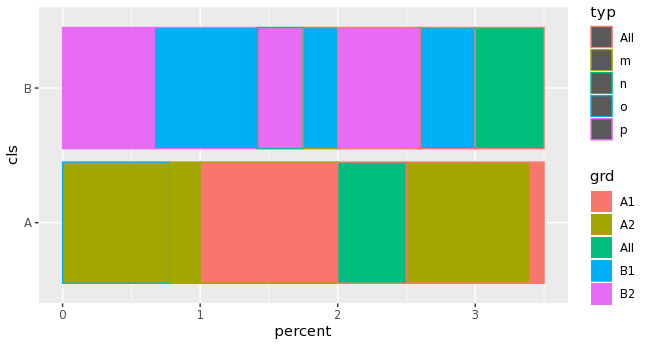
Can we use ggplot2 or sunburst or something to somehow show the proportion of 3 categories in 1 graph (e.g. bar-like chart) ? differentiating with colors or fill ? also, excluding "All" categories if possible.
please dont suggest facets as my real data has many variable
data <- df %>%
  group_by(cls,grd,typ) %>%
  summarise(pnts = sum(pnts)) %>%
  mutate(pct = pnts/sum(pnts)) %>%
  bind_rows(df %>%
              group_by(cls, grd) %>%
              summarise(pnts = sum(pnts)) %>%
              mutate(pct = pnts/sum(pnts),
                     typ = "All")) %>%
  bind_rows(df %>%
              group_by(cls) %>%
              summarise(pnts = sum(pnts)) %>%
              mutate(pct = pnts/sum(pnts),
                     grd = "All",
                     typ = "All"))
#### Attempt to visualize all the ratios in 1 chart

data %>%
  pivot_longer(cols = -c(cls:pnts),
               names_to = "per_cat",
               values_to = "percent") %>%
  ggplot(aes(cls,percent, col = typ, fill = grd)) +
  geom_bar(stat = "identity") +
  coord_flip() +
  theme_bw()
joels
December 16, 2019, 11:02pm
4
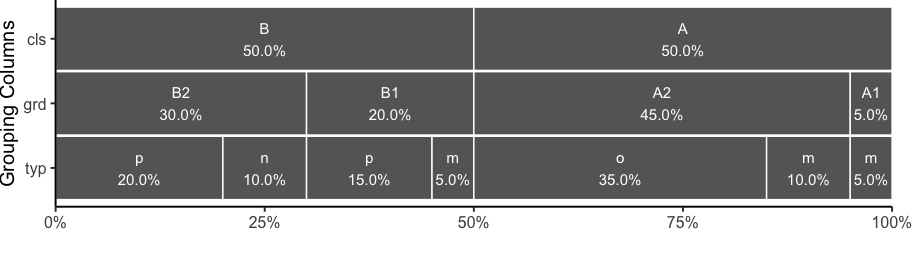
How about this:
library(tidyverse)

groups = c("cls","grd","typ")

1:length(groups) %>%
  map_df(~ df %>%
             group_by_at(groups[1:.x]) %>%
             summarise(pnts = sum(pnts),
                       groups=unique(groups[.x])) %>%
             ungroup %>%
             mutate(pct = pnts/sum(pnts))
  ) %>%
  mutate(subgroup = gsub("-NA", "", paste(!!!syms(groups), sep="-")),
         groups = fct_rev(groups)) %>%
  ggplot(aes(x=groups, y=pct, fill=subgroup)) +
    geom_col(colour="white", width=0.98, show.legend=FALSE) +
    geom_text(aes(label=paste0(gsub(".*-(.*)", "\\1", subgroup),
                               "\n",
                               sprintf("%1.1f", pct*100), "%")),
              position=position_stack(vjust=0.5), colour="white", size=4) +
    scale_fill_manual(values=rep("grey40", 13)) +
    scale_y_continuous(expand=c(0,0), labels=scales::percent) +
    theme_classic(base_size=15) +
    theme(plot.margin=margin(r=15)) +
    coord_flip() +
    labs(x="Grouping Columns", y="")
Thanks a ton @joels , this is amazing.