Grey Window When Opening Existing Project - RStudio Pro 2025.05.1 - RHEL 8

Hello,

I frequently have users of our Rstudio Server Pro system that have existing RStudio Projects created within CIFS mounted network share that just show a blank grey screen when someone attempts to open them.

I just end up telling the user to recreate the RStudio project, anyone aware of a way to trouble shoot this scenario or a likely cause?

Thanks
Stuart

I recommend going through official support channels for the commercial version of RStudio. https://support.posit.co/hc/en-us/requests/new

No idea if it will help in this case, but one thing to try when having problems with RStudio Projects on network shares (or locations that are synced with a cloud drive) is keeping the .Rproj.user folder on a local drive. You can do this via Project Options:
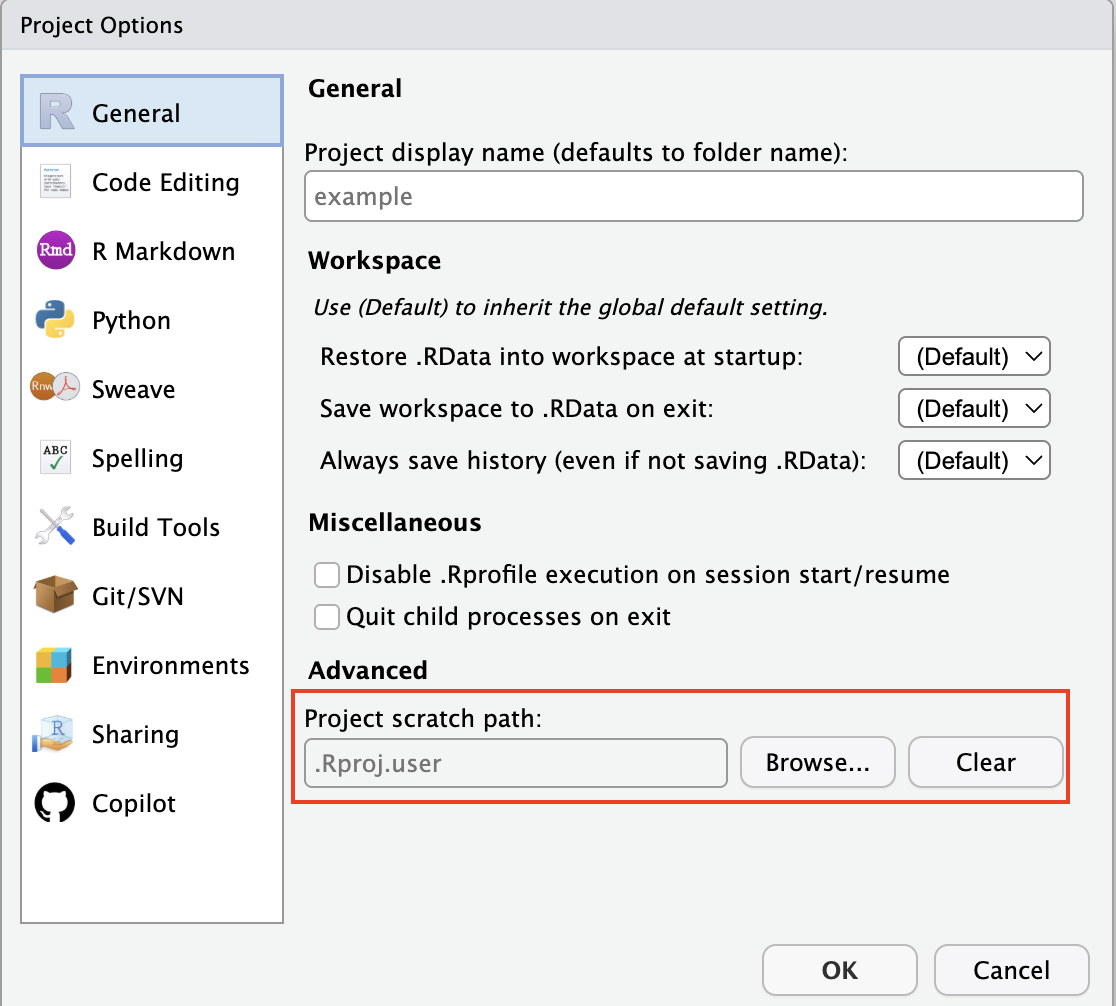
If that proves helpful, it can be configured for all users in RStudio Server Pro via these settings:

Thanks for the reply Gary. The issue seems to be related to corruption in a specific users folders within the .Rproj.user directory. Does anyone know how to determine what RStudio user the 8 string folder relates to? e.g. "Rproj.user\10EA980E". And I think the problem directory is the ctx folder inside of it.

This topic was automatically closed 90 days after the last reply. New replies are no longer allowed.

If you have a query related to it or one of the replies, start a new topic and refer back with a link.