Data Editor does not reflect current data

Dear Posit Community,

I face astrange display problem with the built in data viewer.
Straight after calculation of a list variable I see this:
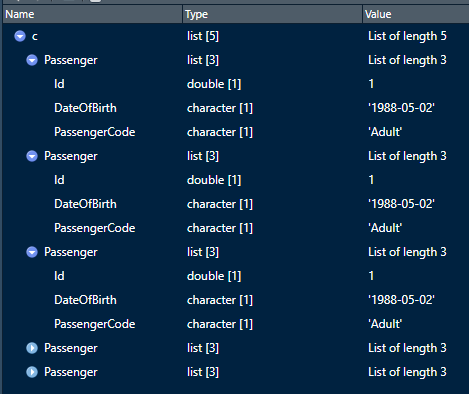
When I use str(c) I see the "real" current data:

List of 5
Passenger:List of 3 .. Id : num 1
.. DateOfBirth : chr "1988-05-02" .. PassengerCode: chr "Adu"
Passenger:List of 3 .. Id : num 2
.. DateOfBirth : chr "1999-01-01" .. PassengerCode: chr "Adu"
Passenger:List of 3 .. Id : num 3
.. Age : num 5 .. PassengerCode: chr "Child"
Passenger:List of 3 .. Id : num 4
.. Age : num 5 .. PassengerCode: chr "Child"
Passenger:List of 3 .. Id : num 5
.. DateOfBirth : chr "2025-05-02" .. PassengerCode: chr "Baby"

As you can see viewer's data does not reflect str(c) data.

I already changed to Software renderiung and deactivated all GPU ticks.

Do you have any suggestion to overcome this problem?
I am operation under Winodws Server 2022 Standard and use RSTudio 2026.05.0 Build 218.

Any help is highly appreciated!

Best regards from Austria,
Martin

1 Like

Hi, can you open an issue at Sign in to GitHub · GitHub, ideally with a standalone repro example, and we'll take a look. Thanks!

1 Like

Hi Gary,

Thanks, for your swift reply.
Right now I wanted to set up a small repo realizing that now teh calculated data and the viewer's presentation align perfectly.

Hence, I guess that I played around too much confusing thze system. I will keep a close on on this and in case that I face it once again I will follow your instructions immediately.

For now, thanks again for dealing with my request so swiftly.
I assume that we can close the thread.

All the best,
Martin

1 Like

Hi Gary,
Thanks, for taking care of this issue so swiftly.
I can see that it already has been solved in the latest RStudio version!

Best regards,
Martin

2 Likes

I've been caught by that before as well. Reopening the Data Viewer or refreshing the object after making changes is a good habit, especially when you're switching between different scripts or environments. It saves a lot of confusion.

1 Like