Charts and Beautiful

Hey, i am pretty new in R studio programming so i want to ask for some advice from you guys.

In my project about car accedent i have to make beautiful plots.
after i have search all around google i found some good codes but unfortuntlly i am struggling to understand
which parts of the codes i have to change for my data..
for example chart like this:
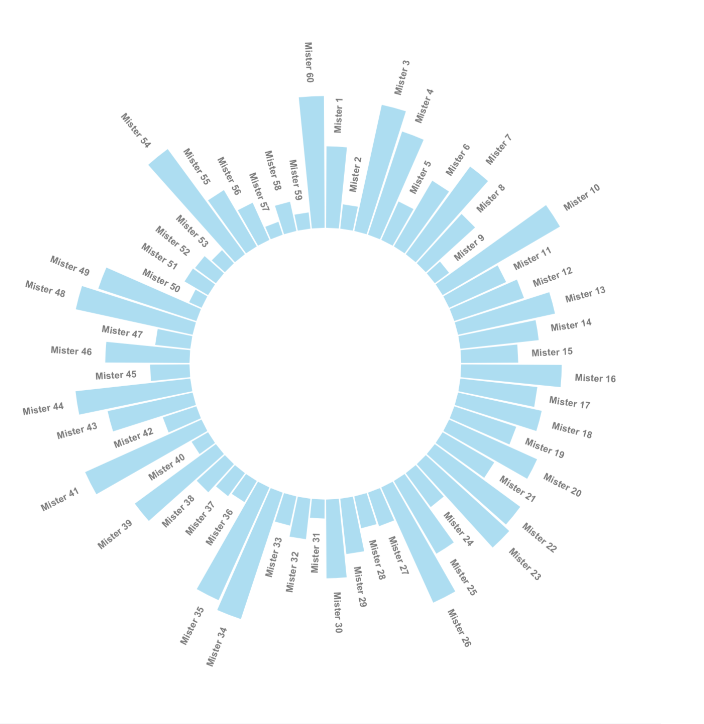
# Libraries
library(tidyverse)
 
# Create dataset
data <- data.frame(
  id=seq(1,60),
  individual=paste( "Mister ", seq(1,60), sep=""),
  value=sample( seq(10,100), 60, replace=T)
)
 
# ----- This section prepare a dataframe for labels ---- #
# Get the name and the y position of each label
label_data <- data
 
# calculate the ANGLE of the labels
number_of_bar <- nrow(label_data)
angle <-  90 - 360 * (label_data$id-0.5) /number_of_bar     # I substract 0.5 because the letter must have the angle of the center of the bars. Not extreme right(1) or extreme left (0)
 
# calculate the alignment of labels: right or left
# If I am on the left part of the plot, my labels have currently an angle < -90
label_data$hjust<-ifelse( angle < -90, 1, 0)
 
# flip angle BY to make them readable
label_data$angle<-ifelse(angle < -90, angle+180, angle)
# ----- ------------------------------------------- ---- #
 
 
# Start the plot
p <- ggplot(data, aes(x=as.factor(id), y=value)) +       # Note that id is a factor. If x is numeric, there is some space between the first bar
  
  # This add the bars with a blue color
  geom_bar(stat="identity", fill=alpha("skyblue", 0.7)) +
  
  # Limits of the plot = very important. The negative value controls the size of the inner circle, the positive one is useful to add size over each bar
  ylim(-100,120) +
  
  # Custom the theme: no axis title and no cartesian grid
  theme_minimal() +
  theme(
    axis.text = element_blank(),
    axis.title = element_blank(),
    panel.grid = element_blank(),
    plot.margin = unit(rep(-1,4), "cm")      # Adjust the margin to make in sort labels are not truncated!
  ) +
  
  # This makes the coordinate polar instead of cartesian.
  coord_polar(start = 0) +
  
  # Add the labels, using the label_data dataframe that we have created before
  geom_text(data=label_data, aes(x=id, y=value+10, label=individual, hjust=hjust), color="black", fontface="bold",alpha=0.6, size=2.5, angle= label_data$angle, inherit.aes = FALSE ) 
 
p

I want to ask you guys for help to marker me the places that i have to change and what i have to put inside of each change.
thanks you!
Hi @Tomer , first for start you need have the data with the same order of this example:

Next, is necesary evaluate line by line if the data adjust of the entire code.

# > data
# id individual value
# 1   1   Mister 1    67
# 2   2   Mister 2    75
# 3   3   Mister 3    50
# 4   4   Mister 4    89
# 5   5   Mister 5    36
# 6   6   Mister 6    50
# 7   7   Mister 7    30
# 8   8   Mister 8    46
# 9   9   Mister 9    11
# 10 10  Mister 10    53
# 11 11  Mister 11    58
# 12 12  Mister 12   100

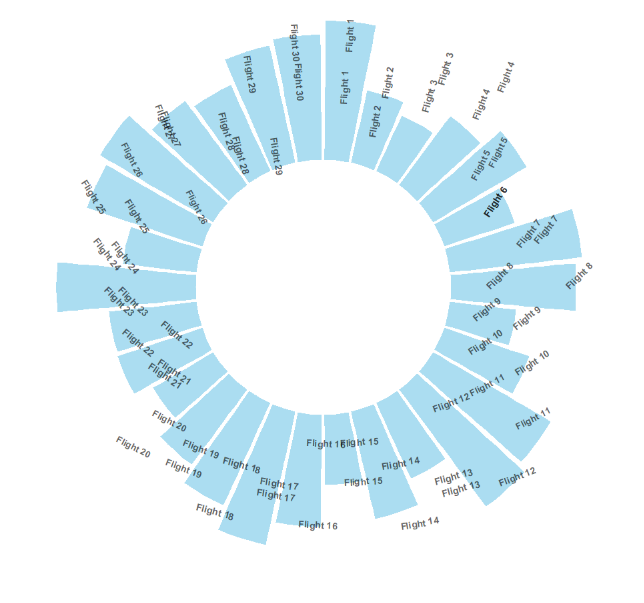
hey, so i have been trying to fix the code and thats the result that i have got

i used the nycflights13 data base
and thats the code.

Create dataset

data <- data.frame(
day=seq(1,30),
carrier=paste( "Flight ", seq(1,30), sep=""),
flight=sample( seq(10,100), 60, replace=T)
)

----- This section prepare a dataframe for labels ----

Get the name and the y position of each label

label_data <- data

calculate the ANGLE of the labels

number_of_bar <- nrow(label_data)
angle <- 90 - 360 * (label_data$day-0.5) /number_of_bar # I substract 0.5 because the letter must have the angle of the center of the bars. Not extreme right(1) or extreme left (0)

calculate the alignment of labels: right or left

If I am on the left part of the plot, my labels have currently an angle < -90

label_data$hjust<-ifelse( angle < -90, 1, 0)

flip angle BY to make them readable

label_data$angle<-ifelse(angle < -90, angle+180, angle)

----- ------------------------------------------- ----

Start the plot

p <- ggplot(data, aes(x=as.factor(day), y=flight)) + # Note that id is a factor. If x is numeric, there is some space between the first bar

This add the bars with a blue color

geom_bar(stat="identity", fill=alpha("skyblue", 0.7)) +

Limits of the plot = very important. The negative value controls the size of the inner circle, the positive one is useful to add size over each bar

ylim(-100,120) +

Custom the theme: no axis title and no cartesian grid

theme_minimal() +
theme(
axis.text = element_blank(),
axis.title = element_blank(),
panel.grid = element_blank(),
plot.margin = unit(rep(-1,4), "cm") # Adjust the margin to make in sort labels are not truncated!
) +

This makes the coordinate polar instead of cartesian.

coord_polar(start = 0) +

Add the labels, using the label_data dataframe that we have created before

geom_text(data=label_data, aes(x=day, y=flight+10, label=carrier, hjust=hjust), color="black", fontface="bold",alpha=0.6, size=2.5, angle= label_data$angle, inherit.aes = FALSE )

p

i will appreacte any kind of help to fix the visual of this plot.
thank you.