Is there a simple fix that doesn't involve creating and managing a Makevars file? I initially installed R with homebrew. I tried reinstalling R from CRAN but I'm still running into the same issues. I'm running on MacOS 15.3.1 and R 4.5.1.
Installing the gfortran compiler allowed me to install the first few packages successfully. I’m still running into new errors every few packages that require making a Makevars file though.
Currently getting:
Error:
! Error installing package 'openssl':
===================================

* installing *source* package ‘openssl’ ...
** this is package ‘openssl’ version ‘2.2.1’
** package ‘openssl’ successfully unpacked and MD5 sums checked
** using staged installation
Homebrew 4.6.15
Using PKG_CFLAGS=-I/opt/homebrew/opt/openssl/include
--------------------------- [ANTICONF] --------------------------------
Configuration failed because openssl was not found. Try installing:
* deb: libssl-dev (Debian, Ubuntu, etc)
* rpm: openssl-devel (Fedora, CentOS, RHEL)
* csw: libssl_dev (Solaris)
* brew: openssl (Mac OSX)
If openssl is already installed, check that 'pkg-config' is in your
PATH and PKG_CONFIG_PATH contains a openssl.pc file. If pkg-config
is unavailable you can set INCLUDE_DIR and LIB_DIR manually via:
R CMD INSTALL --configure-vars='INCLUDE_DIR=... LIB_DIR=...'
-------------------------- [ERROR MESSAGE] ---------------------------
tools/version.c:1:10: fatal error: 'openssl/opensslv.h' file not found
1 | #include <openssl/opensslv.h>
| ^~~~~~~~~~~~~~~~~~~~
1 error generated.
--------------------------------------------------------------------
ERROR: configuration failed for package ‘openssl’
I didn't pay attention, but the project I'm trying to restore uses R 4.4.1 when the latest R version I have is 4.5.1.
Restoring the project works when deleting more recent versions of R.
I thought renv would automatically pick the right version of R defined in the settings.json file, but it's not the case. Is this normal or did I miss something?
renv activation is triggered through .Rprofile after the R process has already started. At that point, renv itself can’t really choose its own parent process, so the R version must be selected before launching R.
rig knows how to pick R version from renv project and you can use it to launch RStudio or just execute a script in renv project. Positron also uses R version recorded in renv.lock .
R version: renv tracks, but doesn’t help with, the version of R used with the project. renv can’t easily help with this because it’s run inside of R, but you might find tools like rig helpful, as they make it easier to switch between multiple version of R on one computer.
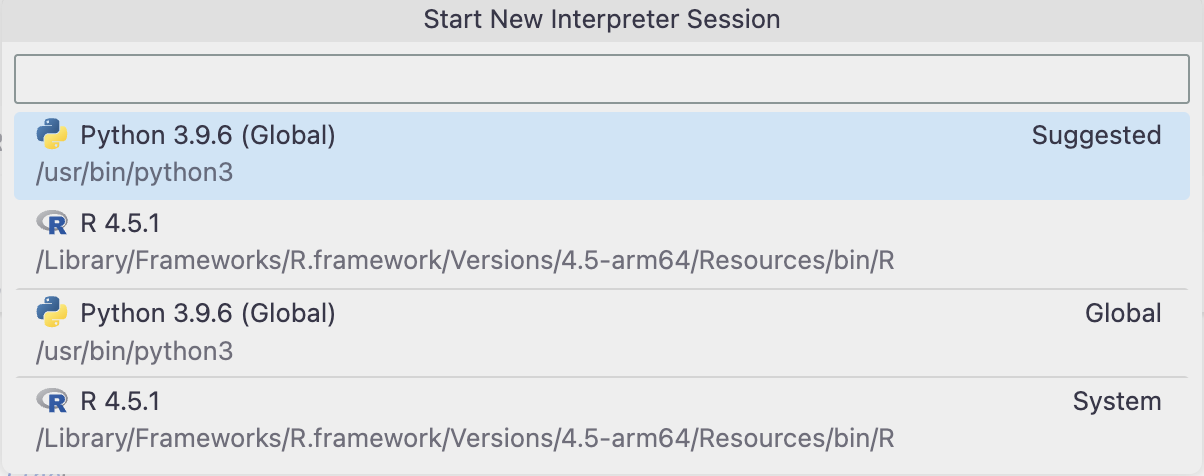
I actually use Positron, but it doesn't let me switch to a different version of R. This is what I get when trying to use another interpreter. I've both R 4.4.1 and 4.5.1 installed.
On macOS, Positron only supports the system’s current R version and other R installations that are orthogonal.
/../
The notion of orthogonality comes from a tool called rig: The R Installation Manager. We highly recommend rig for managing R installation, especially for macOS users who want to have more than one functioning R installation.