I have been unable to install RcppEigen or any package that depends on it (e.g., mice, glmnet, lme4, etc.) using the RStudio IDE on Posit Cloud. The error I get is the following:
ERROR: failed to lock directory ‘/cloud/lib/x86_64-pc-linux-gnu-library/4.4’ for modifying
  Try removing ‘/cloud/lib/x86_64-pc-linux-gnu-library/4.4/00LOCK-RcppEigen’
I tried to get around this by running unlink(‘/cloud/lib/x86_64-pc-linux-gnu-library/4.4/00LOCK-RcppEigen’, recursive=TRUE), and that began the download process, but then the session crashed and had to be reloaded.
I then tried install.packages("RcppEigen", dependencies=TRUE, INSTALL_opts = c('--no-lock')), but that led to the same initial downloading progress and then crashing of the session.
After trying that second option, I'm getting new errors when trying install.packages("glmnet"):
Please help me troubleshoot this. Many important packages rely on RcppEigen, and I imagine other important packages may also require Rcpp-related dependencies that would encounter a similar issue.
Thanks for your comment. I did switch the default to Ubuntu 24.04, but something failed when it tried to update the renv.
I was still encountering the same error as the last one I saw, which came after unlinking the 00LOCK-RcppEigen file:
install.packages('RcppEigen')
Installing package into ‘/cloud/lib/x86_64-pc-linux-gnu-library/4.4’
(as ‘lib’ is unspecified)
trying URL 'http://rspm/default/__linux__/noble/latest/src/contrib/RcppEigen_0.3.4.0.2.tar.gz'
Content type 'application/x-gzip' length 1761370 bytes (1.7 MB)
==================================================
downloaded 1.7 MB

ERROR: failed to lock directory ‘/cloud/lib/x86_64-pc-linux-gnu-library/4.4’ for modifying
Try removing ‘/cloud/lib/x86_64-pc-linux-gnu-library/4.4/00LOCK-RcppEigen’
The downloaded source packages are in
	‘/tmp/Rtmpi0YMK0/downloaded_packages’
Warning message:
In utils::install.packages("RcppEigen") :
  installation of package ‘RcppEigen’ had non-zero exit status
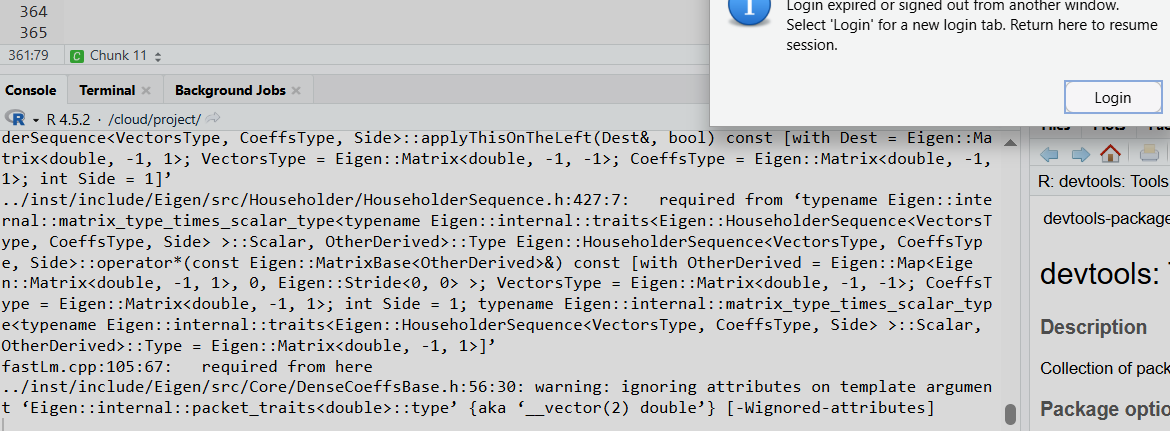
However, after following the advice to remove the 00LOCK-RcppEigen directory, the RcppEigen and glmnet packages did install and load, albeit with a huge amount of printed messages that seemed to repeatedly terminate in the following:
Everything seems okay now except all the printed messages, so I think it's okay to close this ticket unless you foresee a probem based on the printed output.
I'm having the same issue on Posit Cloud with both RcppEigen and BayesFactor, which requires RcppEigen.
Following the advice above, I did remove the lock files, and verified that my OS is set to Ubuntu 24.04. I can now install RcppEigen (following a long string of messages, as described by OP). However, I can't load it; I get the following message:
Error: package or namespace load failed for ‘RcppEigen’ in get(Info[i, 1], envir = env):
 lazy-load database '/cloud/lib/x86_64-pc-linux-gnu-library/4.5/RcppEigen/R/RcppEigen.rdb' is corrupt
In addition: Warning message:
In get(Info[i, 1], envir = env) :
  internal error 1 in R_decompress1 with libdeflate
Trying to install BayesFactor produces the same problem as described by the original poster; many of the printed messages refer to RcppEigen. I've tried installing both RcppEigen and BayesFactor from archive (.tar.gz) files rather than CRAN, and installing both from CRAN with and without dependencies, but get the same results. The packages install, load, and work just fine on my Mac desktop RStudio.
I have a class of 100 students trying to use these packages for an assignment due next week, so any advice is much appreciated!
This means that you loaded a different version of the package than the one installed on the disk right now, probably because you installed a different version after loading the package.
Thank you for the quick reply! Unfortunately, after uninstalling RcppEigen, restarting the R session, removing the lock file (again), and installing RcppEigen again, the install consistently hangs up on this message:
It freezes long enough that I get a popup message: "Login expired or signed out from another window."
I've just repeated those steps for the third time; it always freezes, always on that same line, and has yet to complete the install without kicking me out.
No need to uninstall it, restarting the R session like I suggested above is sufficient...
Anyway, that's not an error message, it is a harmless warning. I would make sure to be logged in to Posit Cloud from one browser window. Then try again.
Since this is an issue with Posit Cloud, I suggest you add that tag to your post, or create a new port that is clearly tagged as "Posit Cloud", so the right people see it and they can help you.
Thanks! I am definitely logged in via only one window (restarted computer to be sure).
I know that warning isn't an error - I just noticed that it's consistently freezing at the same spot in the warnings. Unfortunately, restarting the session wasn't sufficient.
I don't believe I can tag as I'm not the OP here, I'll try starting a new post.
Faced the same issue and followed JJ_Test's procedure on unlinking "4.5/00LOCK-RcppEigen" and "glmnet". Session crashes after a wealth of processing messages upon re-installing RccpEigen and glmnet. My OS is windows 10 Pro, version 22H2, and its build is 19045.6466.
Here is the code I use to run after re-installation;
Yes, I am using Windows 10 -- still haven't upgraded my operating system.
I confirm that I was able to install the version of RTools from the link you shared, and was able to install the "stm" package offline. However, I was initially working from "posit.cloud" and would like to continue working from there.
The problem still persist on posit, with the clash happening at the error messages as shown in this image.