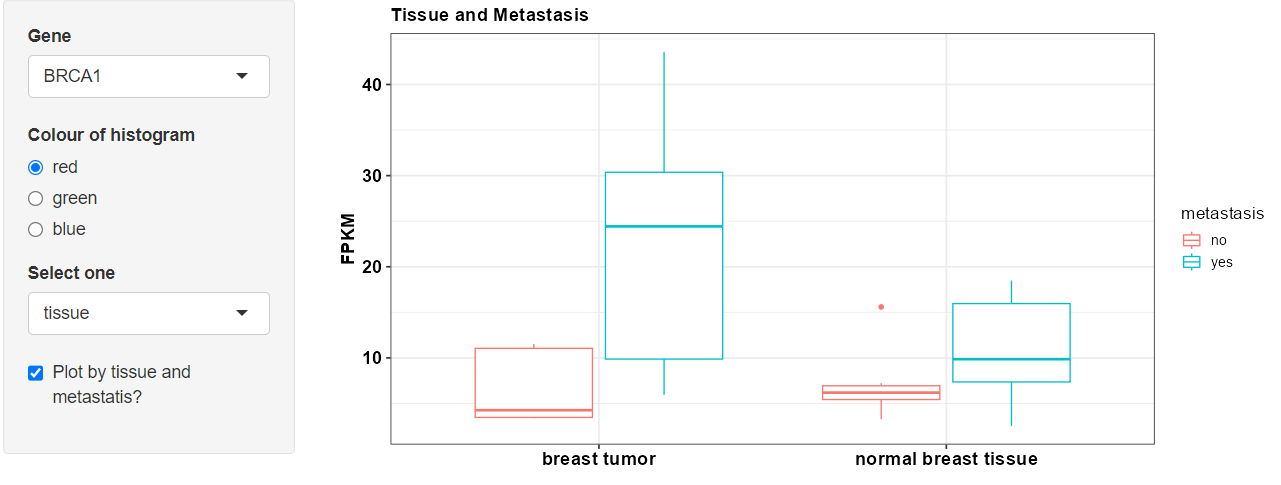
Below is one way to achieve this using a checkboxInput.
ui <- fluidPage(
  sidebarLayout(
    sidebarPanel(
      selectInput("thegene", "Gene", choices = c("BRCA1", "BRCA2", "BRCA3"), selected = "BRCA1"),
      radioButtons("colour","Colour of histogram",choices=c("red","green","blue"),selected="red"),
      selectInput('type', 'Select one', choices = c('tissue', 'metastasis'), selected = 'tissue'),
      checkboxInput('plotby', 'Plot by tissue and metastatis?', value = F),
      width = 3
    ),
    mainPanel(
      plotOutput("boxplot"),
      width = 9
    )
  )
)

server <- function(input, output, session) {

  dat <- reactive({

    if(input$plotby == F) {
      custom_data |>
        filter(gene == input$thegene) |>
        pivot_longer(cols = c('tissue', 'metastasis'), names_to = 'type') |>
        filter(type == input$type)
    } else {
      custom_data |>
        filter(gene == input$thegene) |>
        mutate(value = tissue)
    }

  })

  output$boxplot <- renderPlot({

    g = ggplot(data = dat(), aes(x = value, y = FPKM, fill = gene)) +
      scale_fill_manual(values = input$colour)

    Title = str_to_title(input$type)

    if(input$plotby == T) {
      g = ggplot(data = dat(), aes(x = value, y = FPKM, color = metastasis))

      Title = 'Tissue and Metastasis'
    }

    g +
      geom_boxplot() +
      theme_bw(base_size = 14) +
      labs(x = "", y = "FPKM", title = Title) +
      theme(axis.text=element_text(size=15, face = "bold", color = "black"),
            axis.title=element_text(size=15, face = "bold", color = "black"),
            plot.title = element_text(size=15, face = "bold", color = "black"))
  })

}

shinyApp(ui = ui, server = server)