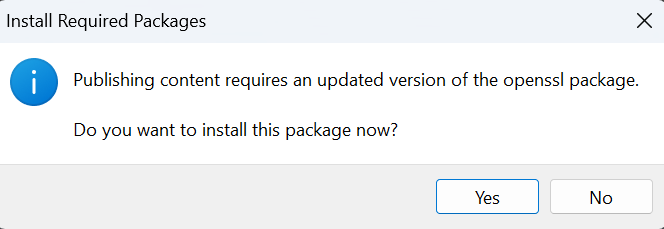
I have recently migrated by shiny apps to Posit Cloud successfully, and the links all work. I went to republish my apps, just to test that they work. Each time, an error appears asking me to update my openssl package. I have tried many times to uninstall and update this package, all of which work successfully. I still cannot get past this error.
Hello!
That "Install Required Packages" prompt seems to come from the RStudio IDE on your machine. RStudio checks the packages that rsconnect needs before it starts a publish. Recent versions of rsconnect need openssl 2.4.2 or newer. If RStudio still finds an older copy, the prompt keeps coming back, even when the install looks like it worked.
This usually happens for one of two reasons:
- The package is in use. openssl was already loaded in your R session, so the file couldn't be replaced, and the old version stayed.
- There's more than one copy. The new version was installed to a different library than the one R checks first.
Here are some steps to try:
- Restart R (Session → Restart R), and before running anything else, run:
install.packages("openssl")
Watch the console for warnings such as "cannot remove prior installation". - Check which version R actually finds, and where:
packageVersion("openssl")
find.package("openssl")
.libPaths()
The version should be 2.4.2 or newer, and the folder should be inside the first path that.libPaths()lists. - If you still get the old version, close RStudio and delete the openssl folder from the library path that
find.package()showed. Then open RStudio and install it again.
It also looks like your republishes went through later that same day. All three apps were updated on Connect Cloud, so you may already be past this. If the prompt still appears after these steps, please reply with the output of the commands in step 2 and your RStudio version (Help → About RStudio), and we can take a closer look.